状态模式的关键是区分事物内部的状态,事物内部状态的改变往往会带来事物的行为改变;
13 状态模式
状态模式的关键是区分事物内部的状态,事物内部状态的改变往往会带来事物的行为改变;
13.1 初识状态模式-电灯程序
- 开关控制电灯的打开关闭状态;
1
2
3
4
5
6
7
8
9
10
11
12
13
14
15
16
17
18
19
20
21
22
23
| var Light = function(){
this.state = 'off';
this.button = null;
};
Light.prototype.init = function(){
var button = document.createElement( 'button' ), self = this;
button.innerHTML = '开关';
this.button = document.body.appendChild( button );
this.button.onclick = function(){ self.buttonWasPressed(); }
};
Light.prototype.buttonWasPressed = function(){
if ( this.state === 'off' ){
console.log( '开灯' );
this.state = 'on';
}else if ( this.state === 'on' ){
console.log( '关灯' );
this.state = 'off';
}
};
var light = new Light();
light.init();
|
上面的例子使用一个变量 state 来记录按钮的当前状态,在事件发生时,再根据这个状态来决定下一步的行为;不过当电灯的状态增加时(如强光,弱光状态等),需要手动修改 buttonWasPressed 函数,这样就是违反程序的开放-封闭原则,状态之间的切换关系是在 buttonWasPressed 函数增加 if-else 判断,当状态很多时, buttonWasPressed 函数会更加难以阅读和维护;
- 状态模式改进电灯程序:
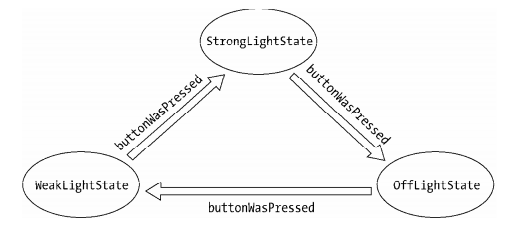
状态模式的关键是把事物的每种状态都封装成单独的类,跟此种状态有关的行为都被封装在这个类的内部,所以 button 被按下的的时候,只需要在上下文中,把这个请求委托给当前的状态对象即可,该状态对象会负责渲染它自身的行为;
1
2
3
4
5
6
7
8
9
10
11
12
13
14
15
16
17
18
19
20
21
22
23
24
25
26
27
28
29
30
31
32
33
34
35
36
37
38
39
40
|
var OffLightState = function( light ){ this.light = light; };
OffLightState.prototype.buttonWasPressed = function(){
console.log( '弱光' );
this.light.setState( this.light.weakLightState );
};
var WeakLightState = function( light ){ this.light = light; };
WeakLightState.prototype.buttonWasPressed = function(){
console.log( '强光' );
this.light.setState( this.light.strongLightState );
};
var StrongLightState = function( light ){ this.light = light; };
StrongLightState.prototype.buttonWasPressed = function(){
console.log( '关灯' );
this.light.setState( this.light.offLightState );
}
var Light = function(){
this.offLightState = new OffLightState( this );
this.weakLightState = new WeakLightState( this );
this.strongLightState = new StrongLightState( this );
this.button = null;
};
Light.prototype.init = function(){
var button = document.createElement( 'button' ), self = this;
this.button = document.body.appendChild( button );
this.button.innerHTML = '开关';
this.currState = this.offLightState;
this.button.onclick = function(){
self.currState.buttonWasPressed();
}
};
Light.prototype.setState = function( newState ){
this.currState = newState;
};
var light = new Light();
light.init();
|
状态模式可以使每一种状态和它对应的行为之间的关系局部化,这些行为被分散和封装在各自对应的状态类之中,便于阅读和管理代码;状态之间的切换都被分布在状态类内部,这使得我们无需编写过多的 if-else 条件分支语言来控制状态之间的转换;
上面例子中若需要为 light 对象增加一种新的状态时,只需要增加一个新的状态类,再稍稍改变一些现有的代码即可;若现在 light 对象多了一种超强光的状态,代码如下:
1
2
3
4
5
6
7
8
9
10
11
12
13
14
15
16
17
18
19
|
var SuperStrongLightState = function( light ){ this.light = light; };
SuperStrongLightState.prototype.buttonWasPressed = function(){
console.log( '关灯' );
this.light.setState( this.light.offLightState );
};
var Light = function(){
this.offLightState = new OffLightState( this );
this.weakLightState = new WeakLightState( this );
this.strongLightState = new StrongLightState( this );
this.superStrongLightState = new SuperStrongLightState( this );
this.button = null;
};
StrongLightState.prototype.buttonWasPressed = function(){
console.log( '超强光' );
this.light.setState( this.light.superStrongLightState );
};
|
13.2 状态模式的通用结构
在电灯的例子中,首先定义了 Light 类, Light类在这里也被称为上下文( Context );随后在 Light 的构造函数中创建每一个状态类的实例对象, Context 将持有这些状态对象的引用,以便把请求委托给状态对象;用户的请求,即点击 button 的动作也是实现在 Context 中的,代码如下:
1
2
3
4
5
6
7
8
9
10
11
12
13
14
| var Light = function(){
this.offLightState = new OffLightState( this );
...
this.button = null;
};
Light.prototype.init = function(){
var button = document.createElement( 'button' ), self = this;
this.button = document.body.appendChild( button );
this.button.innerHTML = '开关';
this.currState = this.offLightState;
this.button.onclick = function(){
self.currState.buttonWasPressed();
}
};
|
接下来要编写各种状态类, light 对象被传入状态类的构造函数,状态对象也需要持有 light 对象的引用,以便调用 light 中的方法或者直接操作 light 对象:
1
2
3
4
5
6
| var OffLightState = function( light ){ this.light = light; };
OffLightState.prototype.buttonWasPressed = function(){
console.log( '弱光' );
this.light.setState( this.light.weakLightState );
};
...
|
13.3 状态模式示例——文件上传
文件上传中,包括有扫描、正在上传、暂停、上传成功、上传失败这几种状态,点击同一个按钮,在上传中和
暂停状态下的行为表现是不一样的,如上传中,点击按钮暂停,暂停中,点击按钮继续播放;
文件上传中,设置 暂停/继续 和 删除两个按钮,点击这两个按钮的发生行为如下:
- 文件在扫描状态中,是不能进行任何操作的,既不能暂停也不能删除文件,只能等待扫描完成。扫描完成之后,根据文件的 md5 值判断,若确认该文件已经存在于服务器,则直接跳到上传完成状态。如果该文件的大小超过允许上传的最大值,或者该文件已经损坏,则跳往上传失败状态。剩下的情况下才进入上传中状态;
- 上传过程中可以点击暂停按钮来暂停上传,暂停后点击同一个按钮会继续上传;
- 扫描和上传过程中,点击删除按钮无效,只有在暂停、上传完成、上传失败之后,才能删除文件;
- 文件上传基本实现:
1
2
3
4
5
6
7
8
9
10
11
12
13
14
15
16
17
18
19
20
21
22
23
24
25
26
27
28
29
30
31
32
33
34
35
36
37
38
39
40
41
42
43
44
45
46
47
48
49
50
51
52
53
54
55
56
57
58
59
60
61
62
63
64
65
66
67
68
69
70
71
72
73
74
75
76
77
78
79
80
81
82
83
84
85
86
87
88
89
90
91
92
93
94
95
96
97
98
99
100
101
102
103
104
105
106
107
108
|
window.external.upload = function( state ){
console.log( state );
};
var plugin = (function(){
var plugin = document.createElement( 'embed' );
plugin.style.display = 'none';
plugin.type = 'application/txftn-webkit';
plugin.sign = function(){ console.log( '开始文件扫描' ); }
plugin.pause = function(){ console.log( '暂停文件上传' ); };
plugin.uploading = function(){ console.log( '开始文件上传' ); };
plugin.del = function(){ console.log( '删除文件上传' ); }
plugin.done = function(){ console.log( '文件上传完成' ); }
document.body.appendChild( plugin );
return plugin;
})();
var Upload = function( fileName ){
this.plugin = plugin;
this.fileName = fileName;
this.button1 = null;
this.button2 = null;
this.state = 'sign';
};
Upload.prototype.init = function(){
var that = this;
this.dom = document.createElement( 'div' );
this.dom.innerHTML =
'<span>文件名称:'+ this.fileName +'</span>\
<button data-action="button1">扫描中</button>\
<button data-action="button2">删除</button>';
document.body.appendChild( this.dom );
this.button1 = this.dom.querySelector( '[data-action="button1"]' );
this.button2 = this.dom.querySelector( '[data-action="button2"]' );
this.bindEvent();
};
Upload.prototype.bindEvent = function(){
var self = this;
this.button1.onclick = function(){
if ( self.state === 'sign' ){
console.log( '扫描中,点击无效...' );
}else if ( self.state === 'uploading' ){
self.changeState( 'pause' );
}else if ( self.state === 'pause' ){
self.changeState( 'uploading' );
}else if ( self.state === 'done' ){
console.log( '文件已完成上传, 点击无效' );
}else if ( self.state === 'error' ){
console.log( '文件上传失败, 点击无效' );
}
};
this.button2.onclick = function(){
if ( self.state === 'done' || self.state === 'error' || self.state === 'pause' ){
self.changeState( 'del' );
}else if ( self.state === 'sign' ){
console.log( '文件正在扫描中,不能删除' );
}else if ( self.state === 'uploading' ){
console.log( '文件正在上传中,不能删除' );
}
};
};
Upload.prototype.changeState = function( state ){
switch( state ){
case 'sign':
this.plugin.sign();
this.button1.innerHTML = '扫描中,任何操作无效';
break;
case 'uploading':
this.plugin.uploading();
this.button1.innerHTML = '正在上传,点击暂停';
break;
case 'pause':
this.plugin.pause();
this.button1.innerHTML = '已暂停,点击继续上传';
break;
case 'done':
this.plugin.done();
this.button1.innerHTML = '上传完成';
break;
case 'error':
this.button1.innerHTML = '上传失败';
break;
case 'del':
this.plugin.del();
this.dom.parentNode.removeChild( this.dom );
console.log( '删除完成' );
break;
}
this.state = state;
};
var uploadObj = new Upload( 'JavaScript 设计模式与开发实践' );
uploadObj.init();
window.external.upload = function( state ){
uploadObj.changeState( state );
};
window.external.upload( 'sign' );
setTimeout(function(){
window.external.upload( 'uploading' );
}, 1000 );
setTimeout(function(){
window.external.upload( 'done' );
}, 5000 );
|
- 状态模式重构文件上传程序:
1
2
3
4
5
6
7
8
9
10
11
12
13
14
15
16
17
18
19
20
21
22
23
24
25
26
27
28
29
30
31
32
33
34
35
36
37
38
39
40
41
42
43
44
45
46
47
48
49
50
51
52
53
54
55
56
57
58
59
60
61
62
63
64
65
66
67
68
69
70
71
72
73
74
75
76
77
78
79
80
81
82
83
84
85
86
87
88
89
90
91
92
93
94
95
96
97
98
99
100
101
102
103
104
105
106
107
108
109
110
111
112
113
114
115
116
117
118
119
120
121
122
123
124
125
126
127
128
|
window.external.upload = function( state ){
console.log( state );
};
var plugin = (function(){
var plugin = document.createElement( 'embed' );
plugin.style.display = 'none';
plugin.type = 'application/txftn-webkit';
plugin.sign = function(){ console.log( '开始文件扫描' ); }
plugin.pause = function(){ console.log( '暂停文件上传' ); };
plugin.uploading = function(){ console.log( '开始文件上传' ); };
plugin.del = function(){ console.log( '删除文件上传' ); }
plugin.done = function(){ console.log( '文件上传完成' ); }
document.body.appendChild( plugin );
return plugin;
})();
var Upload = function( fileName ){
this.plugin = plugin;
this.fileName = fileName;
this.button1 = null;
this.button2 = null;
this.signState = new SignState( this );
this.uploadingState = new UploadingState( this );
this.pauseState = new PauseState( this );
this.doneState = new DoneState( this );
this.errorState = new ErrorState( this );
this.currState = this.signState;
};
Upload.prototype.init = function(){
var that = this;
this.dom = document.createElement( 'div' );
this.dom.innerHTML =
'<span>文件名称:'+ this.fileName +'</span>\
<button data-action="button1">扫描中</button>\
<button data-action="button2">删除</button>';
document.body.appendChild( this.dom );
this.button1 = this.dom.querySelector( '[data-action="button1"]' );
this.button2 = this.dom.querySelector( '[data-action="button2"]' );
this.bindEvent();
};
Upload.prototype.bindEvent = function(){
var self = this;
this.button1.onclick = function(){
self.currState.clickHandler1();
}
this.button2.onclick = function(){
self.currState.clickHandler2();
}
};
Upload.prototype.sign = function(){
this.plugin.sign();
this.currState = this.signState;
};
Upload.prototype.uploading = function(){
this.button1.innerHTML = '正在上传,点击暂停';
this.plugin.uploading();
this.currState = this.uploadingState;
};
Upload.prototype.pause = function(){
this.button1.innerHTML = '已暂停,点击继续上传';
this.plugin.pause();
this.currState = this.pauseState;
};
Upload.prototype.done = function(){
this.button1.innerHTML = '上传完成';
this.plugin.done();
this.currState = this.doneState;
};
Upload.prototype.error = function(){
this.button1.innerHTML = '上传失败';
this.currState = this.errorState;
};
Upload.prototype.del = function(){
this.plugin.del();
this.dom.parentNode.removeChild( this.dom );
};
var StateFactory = (function(){
var State = function(){};
State.prototype.clickHandler1 = function(){
throw new Error( '子类必须重写父类的 clickHandler1 方法' );
}
State.prototype.clickHandler2 = function(){
throw new Error( '子类必须重写父类的 clickHandler2 方法' );
}
return function( param ){
var F = function( uploadObj ){ this.uploadObj = uploadObj; };
F.prototype = new State();
for ( var i in param ){
F.prototype[ i ] = param[ i ];
}
return F;
}
})();
var SignState = StateFactory({
clickHandler1: function(){ console.log( '扫描中,点击无效...' ); },
clickHandler2: function(){ console.log( '文件正在上传中,不能删除' ); }
});
var UploadingState = StateFactory({
clickHandler1: function(){ this.uploadObj.pause(); },
clickHandler2: function(){ console.log( '文件正在上传中,不能删除' ); }
});
var PauseState = StateFactory({
clickHandler1: function(){ this.uploadObj.uploading(); },
clickHandler2: function(){ this.uploadObj.del(); }
});
var DoneState = StateFactory({
clickHandler1: function(){ console.log( '文件已完成上传, 点击无效' ); },
clickHandler2: function(){ this.uploadObj.del(); }
});
var ErrorState = StateFactory({
clickHandler1: function(){ console.log( '文件上传失败, 点击无效' ); },
clickHandler2: function(){ this.uploadObj.del(); }
});
var uploadObj = new Upload( 'JavaScript 设计模式与开发实践' );
uploadObj.init();
window.external.upload = function( state ){ uploadObj[ state ](); };
window.external.upload( 'sign' );
setTimeout(function(){
window.external.upload( 'uploading' );
}, 1000 );
setTimeout(function(){
window.external.upload( 'done' );
}, 5000 );
|
13.4 状态模式的优缺点及性能优化点
- 状态模式的优点:
- 状态模式定义了状态与行为之间的关系,并将它们封装在一个类里,通过增加新的状态类,很容易增加新的状态和转换;
- 避免
Context 无限膨胀,状态切换的逻辑被分布在状态类中,也去掉了 Context 中原本过多的条件分支;
- 用对象代替字符串来记录当前状态,使得状态的切换更加一目了然;
Context 中的请求动作和状态类中封装的行为可以非常容易地独立变化而互不影响;
- 状态模式的缺点:
状态模式会在系统中定义许多状态类,并且生成许多对象;同时由于逻辑分散在状态类中,虽然减少了 if-else分支语句,但也造成了逻辑分散的问题;
- 状态模式性能优化点:
- 有两种选择来管理
state 对象的创建和销毁,第一种是仅当 state 对象被需要时才创建并随后销毁,能有效的节省内存;另一种是一开始就创建好所有的状态对象,并且始终不销毁它们,适用于状态的改变很频繁的场景中;
- 本章的例子中,为每个
Context 对象都创建了一组 state 对象,实际上这些 state 对象之间是可以共享的,各 Context 对象可以共享一个 state 对象,这也是享元模式的应用场景之一;
13.5 状态模式和策略模式的关系
状态模式和策略模式都封装了一系列的算法或者行为,它们的类图看起来来几乎一模一样,但在意图上有很大不同,因此它们是两种迥然不同的模式;策略模式和状态模式的相同点是都有一个上下文、一些策略或者状态类,上下文把请求委托给这些类来执行;区别是策略模式中的各个策略类之间是平等又平行的,它们之间没有任何联系,所以必须熟知这些策略类的作用,以便可以随时主动切换算法;而在状态模式中,状态和状态对应的行为是早已被封装好的,状态之间的切换也早被规定完成,“改变行为”这件事情发生在状态模式内部,因此我们不需要了解这些细节;
13.6 JavaScript 版本的状态机
前面示例都是模拟传统面向对象语言的状态模式实现,为每种状态都定义一个状态子类,然后在 Context 中持有这些状态对象的引用,以便把 currState 设置为当前的状态对象;在 JavaScript 这种“无类”语言中,没有规定让状态对象一定要从类中创建而来。另外, JavaScript 可以非常方便地使用委托技术,并不需要事先让一个对象持有另一个对象。
下面的状态机选择了通过 Function.prototype.call 方法直接把请求委托给某个字面量对象来执行:
1
2
3
4
5
6
7
8
9
10
11
12
13
14
15
16
17
18
19
20
21
22
23
24
25
26
27
28
29
30
31
32
33
34
35
36
37
38
39
40
41
42
43
44
45
46
47
48
49
50
51
52
53
54
55
56
57
58
59
60
61
62
63
64
65
66
67
68
69
|
var Light = function(){
this.currState = FSM.off;
this.button = null;
};
Light.prototype.init = function(){
var button = document.createElement( 'button' ), self = this;
button.innerHTML = '已关灯';
this.button = document.body.appendChild( button );
this.button.onclick = function(){
self.currState.buttonWasPressed.call( self );
}
};
var FSM = {
off: {
buttonWasPressed: function(){
console.log( '关灯' );
this.button.innerHTML = '下一次按我是开灯';
this.currState = FSM.on;
}
},
on: {
buttonWasPressed: function(){
console.log( '开灯' );
this.button.innerHTML = '下一次按我是关灯';
this.currState = FSM.off;
}
}
};
var light = new Light();
light.init();
var delegate = function( client, delegation ){
return {
buttonWasPressed: function(){
return delegation.buttonWasPressed.apply( client, arguments );
}
}
};
var FSM = {
off: {
buttonWasPressed: function(){
console.log( '关灯' );
this.button.innerHTML = '下一次按我是开灯';
this.currState = this.onState;
}
},
on: {
buttonWasPressed: function(){
console.log( '开灯' );
this.button.innerHTML = '下一次按我是关灯';
this.currState = this.offState;
}
}
};
var Light = function(){
this.offState = delegate( this, FSM.off );
this.onState = delegate( this, FSM.on );
this.currState = this.offState;
this.button = null;
};
Light.prototype.init = function(){
var button = document.createElement( 'button' ), self = this;
button.innerHTML = '已关灯';
this.button = document.body.appendChild( button );
this.button.onclick = function(){ self.currState.buttonWasPressed(); }
};
var light = new Light();
light.init();
|
13.7 状态模式小结
状态模式是非常有效的模式之一,通过状态模式重构代码之后,会让代码会变得清晰。虽然状态模式一开始并不是非常容易理解,但有必须去好好掌握这种设计模式。
系列链接
- JavaScript 设计模式基础知识
- JavaScript 设计模式(一)单例模式
- JavaScript 设计模式(二)策略模式
- JavaScript 设计模式(三)代理模式
- JavaScript 设计模式(四)迭代器模式
- JavaScript 设计模式(五)发布订阅模式
- JavaScript 设计模式(六)命令模式
- JavaScript 设计模式(七)组合模式
- JavaScript 设计模式(八)模板方法模式
- JavaScript 设计模式(九)享元模式
- JavaScript 设计模式(十)职责链模式
- JavaScript 设计模式(十一)中介者模式
- JavaScript 设计模式(十二)装饰者模式
- JavaScript 设计模式(十三)状态模式
- JavaScript 设计模式(十四)适配器模式
- JavaScript 设计模式(下)设计原则
- JavaScript 设计模式练习代码